Taco Joe
Arcade · Free browser game · Mobile & desktop
Heating up the grill…
For true full screen: Share, then Add to Home Screen.
Turn your phone sideways for a bigger, full-screen kitchen.
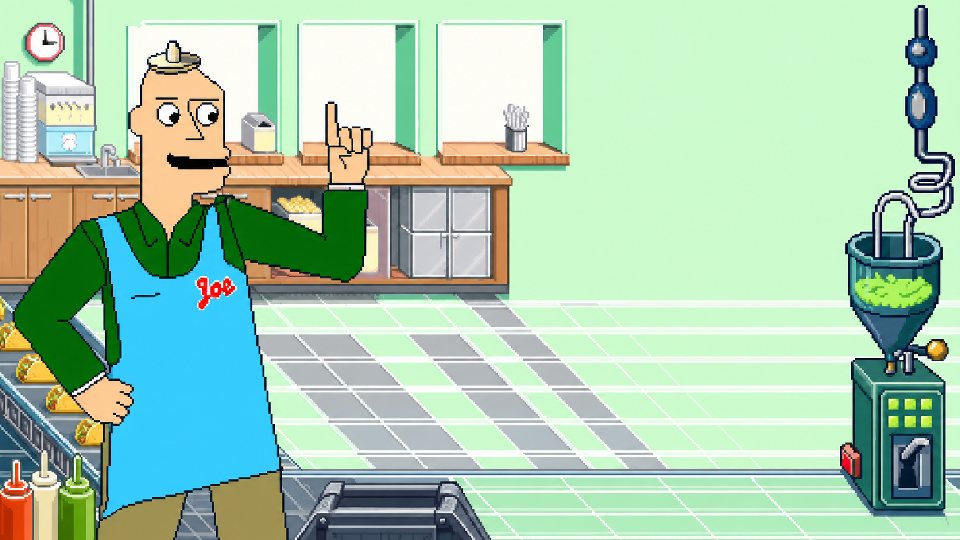
Build tacos on a moving conveyor in Taco Joe, the classic Shockwave-era kitchen arcade game restored with its original artwork and sounds for mobile and desktop browsers.
How To Play
Taco Joe is a fast-paced assembly-line arcade game played on a wide landscape screen. Customers crowd the three serving windows of Joe's restaurant and call out orders, shown on the red, white, and green panels of the counter display. Taco shells ride the conveyor from left to right — time drops from the active meat, cheese, salsa, guacamole, and sour-cream dispensers so every required topping lands on a passing shell.
When a finished taco reaches the gate at the end of the belt, hit the red, white, or green block on the dispatch tower to shoot it up the pneumatic pipe to the matching window. Every active dispenser is required, duplicate toppings splat, and incomplete tacos make customers angry. Letting a taco fall off the belt costs a life and sends out a replacement shell while the line keeps moving; squashing the roach earns 500 points.
The History Of Taco Joe
Taco Joe began as a Macromedia Director game delivered through the Shockwave browser plugin — a .dcr movie, not a Flash .swf — in the early-2000s era of browser game portals. When browsers retired the Shockwave plugin the original stopped being playable on the web, so the rights holder rebuilt it from the original Director movie: the recovered artwork, sound effects, shouted taco calls, seven-level campaign, health-inspector inspections, and the 500-point roach all come from the original cast members, restored for phones and desktops with no plugin required.
Controls
Touch
- Hold your phone in landscape — the game uses a wide 16:9 screen.
- Use the thumb buttons along the bottom edge: topping buttons on the left, red / white / green dispatch buttons on the right.
- You can also tap the topping machines and tower blocks directly; time drops so they land on a shell passing below.
- Tap the roach when it scurries across the belt for bonus points.
- The circle, square, and triangle marks identify the red, white, and green windows without relying on color.
- Tapping START goes fullscreen where the browser allows it; the corner-brackets button toggles it any time. On iPhone, use Share → Add to Home Screen to play without browser bars.
Mouse
- Click the topping machines to drop toppings on passing shells.
- Click the red / white / green tower blocks to dispatch the gate taco.
- Click the roach for bonus points.
Keyboard
- 1 / 2 / 3 / 4 / 5 — drop meat / cheese / salsa / guacamole / sour cream
- J / K / L or Left / Down / Right — hit the red / white / green block
- Enter or Space — start
- P — pause or resume
- M — mute or unmute
- F — fullscreen on or off
- R — swat the roach
- H — how to play (on the title screen)
Frequently Asked Questions
- Was Taco Joe a Flash game?
- It is often remembered as one, but the original Taco Joe was built with Macromedia Director and shipped as a Shockwave .dcr movie — a different plugin and format from Flash .swf games. That is why it disappeared when browsers dropped the Shockwave plugin, and why this restoration rebuilds it from the original Director movie instead of running an emulator.
- Is this the original conveyor-belt Taco Joe?
- Yes — this is the rights holder's restoration of the classic conveyor-belt kitchen game, with the recovered original artwork, sounds, and seven-level health-inspector campaign. It is unrelated to the later mobile taco-tossing app that shared the name.
- Can I play Taco Joe on my phone?
- Yes. Rotate to landscape and use the thumb buttons along the bottom of the screen — topping buttons on the left, red / white / green dispatch buttons on the right. Desktop players can use the mouse or the keyboard.
COMMUNITY BOARD
Comments